TileStencil

SPRAY PAINT STENCIL MAKER

Make your own spray paint stencil from any photo or logo.

Adjust the stencil with a live preview, let automatic bridges hold the islands in place, then print it at full size across normal paper or export an SVG to cut from mylar.

No uploadsReading, processing, and PDF export all happen locally.

SOURCE IMAGE

Choose a local image

No image? Try a sample:

FINAL OUTPUT

Real-world size

PAPER

Paper and margins

Orientation

Current paper: 210 × 297 mm.

IMAGE EFFECT

Export style

Example: photo to stencil
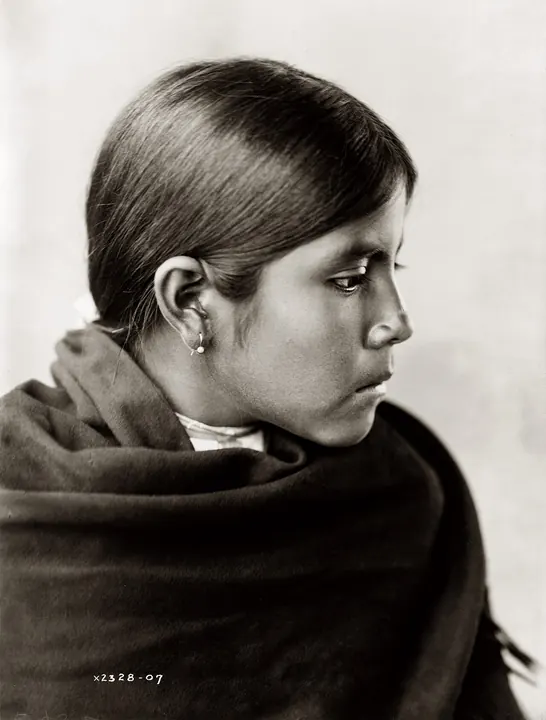
Original photo of a portrait of a girl in profileOriginal
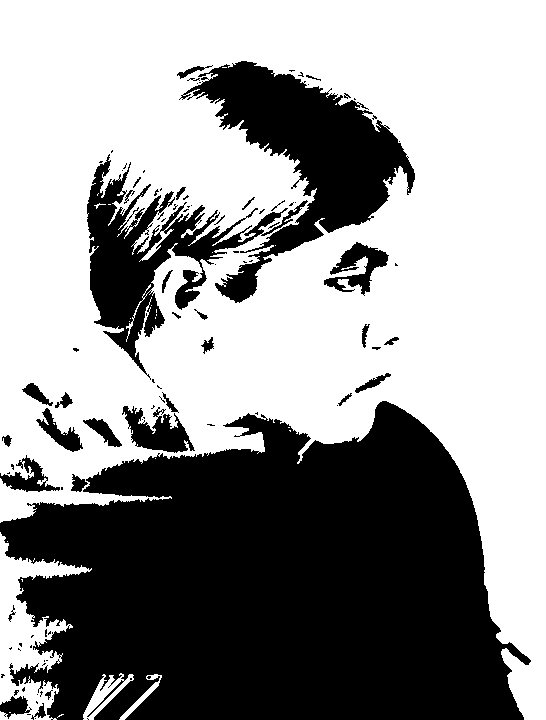
Stencil made from the photo of a portrait of a girl in profileStencil, threshold 65
Made with this page in one step. Black areas are cut out. Photo: Edward S. Curtis, 1907, Wikimedia Commons (public domain)

What makes a stencil work for spray paint

Spray paint finds every gap. A stencil that looks fine on screen can bleed or fall apart in use, so the tool removes specks too small to cut cleanly and connects every island (the middle of an O, the white of an eye) to the rest of the sheet with a bridge. In the stencil, black is what you cut out and where paint will land.

Choose the material

  • Printer paper or cardstock: fine for one use; seal the front with a coat of clear spray first so it does not soak through.
  • Poster board or file folders: cheap and stiff enough for a few passes.
  • Mylar (7–10 mil): reusable for hundreds of sprays; cut it by hand with a hot knife or on a Cricut or laser using the SVG export.
  • Adhesive stencil vinyl: the crispest edges on walls, glass, and furniture, but only good for one application.

Make a two-layer stencil with two thresholds

  • Export once at a low threshold: this layer holds only the darkest shadows.
  • Export again at a higher threshold: this layer adds the mid-tones.
  • Spray the lighter colour through the mid-tone layer first, let it dry, then line up the shadow layer and spray the dark colour. The same image and size keep the two layers in register.

Spraying tips for crisp edges

  • Use repositionable spray adhesive on the back of the stencil so paint cannot creep underneath.
  • Hold the can 15–25 cm away and build up two or three light coats instead of one heavy one.
  • Spray straight on, not at an angle, especially near bridges.
  • Lift the stencil while the last coat is still slightly tacky.

Frequently asked questions

How do I make a spray paint stencil from a picture?

Choose the picture on this page, move the threshold until the black-and-white preview shows clean shapes, keep automatic bridges on, and enter the size you want. Print the PDF at Actual Size and cut out the black areas, or export the SVG to cut it on a machine.

How thick should the bridges be for spray paint?

About 3 mm for paper and poster board, and 3–4 mm for mylar you plan to reuse. Thinner bridges look nicer but tear after a few uses.

Can I make a big stencil for a wall or a car?

Yes. Enter the full width, for example 150 cm, and the PDF is split across as many sheets as needed with page numbers and overlap marks. Tape the sheets together, then transfer the outline to your stencil material.

Is it free?

Making the stencil and printing the tiled PDF are free with no account. A cut-ready SVG for cutting machines costs $1.99 per image.

PRINTING USE CASES

Printable Project Guides & Tutorials

TileStencil outputs 100% actual-size multi-page PDFs for craft and large-format printing. Explore guides tailored to your project:

Photo to Stencil Maker

Turn any photo into an adjustable black-and-white stencil and print it at actual size.

Make a stencil →

Pumpkin Stencil Maker

Make a custom pumpkin carving stencil from any photo, sized to your pumpkin.

Make a pumpkin stencil →

Cricut Stencil Maker

Photo to cut-ready SVG with bridges, sized for Cricut and laser cutters.

Make an SVG stencil →

Wood Burning Stencil Maker

Photo to pyrography outlines at the size of your board, with transfer methods.

Make a wood burning pattern →

Airbrush Stencil Maker

Positive and negative airbrush stencils and masks from any image.

Make an airbrush stencil →

Free Halloween Stencils

Pumpkin faces, bats, skulls, spider webs and more, with bridges. Free PDF downloads.

Get free stencils →

Free Christmas Stencils

Snowflakes, stars, trees, reindeer and more, with bridges. Free PDF downloads.

Get free stencils →

Free Flower Stencils

Daisies, roses, butterflies, leaves and more, with bridges. Free PDF downloads.

Get free stencils →

Free Animal Stencils

Dogs, cats, wolves, horses, unicorns, dinosaurs and more. Free PDF downloads.

Get free stencils →

Letter Stencil Generator

Type any word and print stencil letters or numbers at any size across pages.

Make letter stencils →

Tattoo Stencil Maker

Turn a design into a clean stencil and print it at the exact size for the placement.

Make a tattoo stencil →

Drawing Grid Maker

Add numbered squares to a reference photo and get the matching grid for your canvas or wall.

Make a drawing grid →

Multi-Page Poster Printing

Split high-resolution photos across standard A4/A3 sheets for giant wall posters.

Read poster guide →

Wall Stencils & Murals

Generate crisp high-contrast monochrome contours for mural transfers and tracing.

Read mural guide →

1:1 Craft & Sewing Patterns

Preserve exact physical mm scale for leathercraft, sewing blocks, and Cosplay.

Read pattern guide →

Event Signs & Large Banners

Tile multi-meter slogan banners horizontally across standard printer paper.

Read banner guide →

Stained Glass Patterns

Output 100% actual size line art tailored for foil and came assembly.

Read stained glass guide →

Scroll Saw Woodworking

Full-scale adhesive templates for precision scroll sawing and router engraving.

Read scroll saw guide →

The Rasterbator Alternative

Tile print large posters with original clarity and zero halftone dot pixelation.

Read comparison →

Print Without Adobe Acrobat

Free visual multi-sheet tiling without paying for Adobe Acrobat Pro.

Read free guide →

Blockposters Alternative

Free multi-page poster tiling with zero watermarks and no 7-page limit.

Read alternative guide →

Print A0 Patterns on A4

Tile large A0 sewing and cosplay patterns at 100% scale on home printers.

Read sewing guide →