TileStencil

WOOD BURNING STENCIL MAKER

Turn any photo into a wood burning pattern at the size of your board.

Get clean, high-contrast outlines with a live preview, print the pattern at exact size, and transfer it to wood with graphite paper, heat, or a pin. Free, and your photo never leaves your browser.

No uploadsReading, processing, and PDF export all happen locally.

SOURCE IMAGE

Choose a local image

No image? Try a sample:

FINAL OUTPUT

Real-world size

PAPER

Paper and margins

Orientation

Current paper: 210 × 297 mm.

IMAGE EFFECT

Export style

Example: photo to stencil
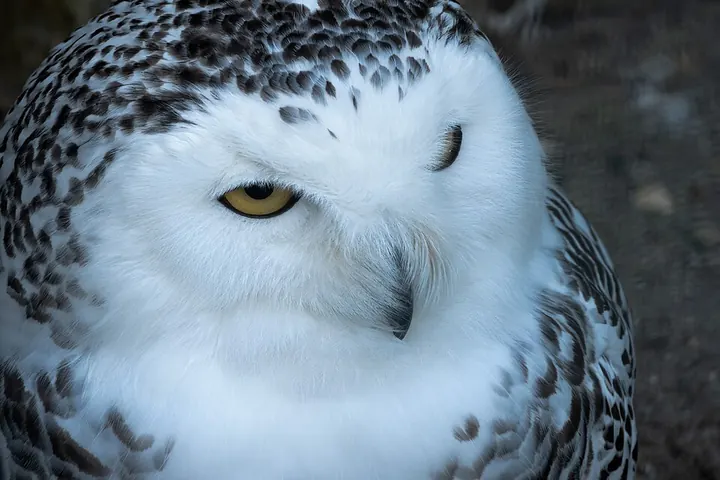
Original photo of a snowy owlOriginal
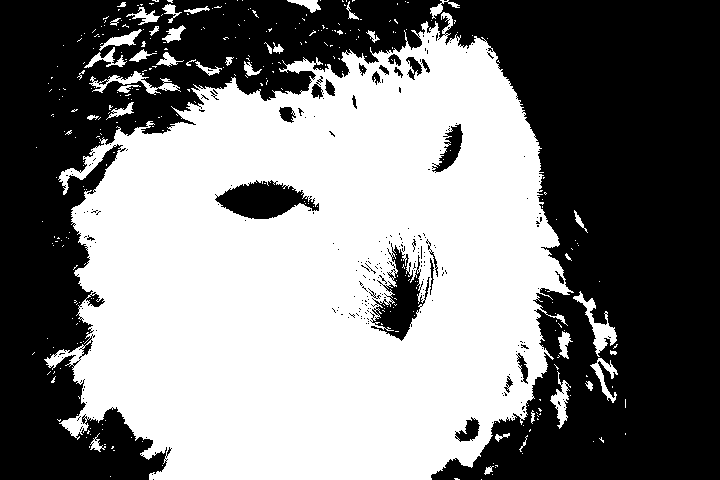
Stencil made from the photo of a snowy owlStencil, threshold 125
Made with this page in one step. Black areas are cut out. Photo: Wikimedia Commons (CC0)

Outline or shading?

Wood burning patterns come in two styles. A low threshold gives bold outlines that are easy to trace and burn with a writing tip. A higher threshold keeps the darker areas as solid shapes you can shade with a shading tip. Cutting islands do not matter here because nothing is cut out, so bridges are off by default.

Three ways to transfer the pattern to wood

  • Graphite transfer paper: place it under the printout and trace the lines with a ballpoint pen. The easiest and cleanest method for beginners.
  • Heat transfer: print a mirrored copy on a laser printer (turn on Mirror or Flip in the print dialog), place it face down on the wood, and press with a transfer tip or an iron. Inkjet prints do not transfer.
  • Pinprick and pencil: tape the printout down, prick along the lines with a pin, then join the dots in pencil. Works on curved or rough surfaces.

Getting a clean burn

  • Sand the board to 220 grit before transferring so the lines sit on a smooth surface.
  • Pale, close-grained woods such as basswood, birch, and maple show the most detail.
  • Burn the outlines first at low heat, then go back for shading.
  • For a cut-out version (for example a scroll saw project), see printing scroll saw patterns.

Frequently asked questions

How do I turn a photo into a wood burning pattern?

Choose the photo on this page, switch to the black-and-white template if it is not already on, and move the threshold until the outlines look the way you want to burn them. Enter the size of your board and print the PDF at Actual Size, then transfer it to the wood.

What size should the pattern be?

Measure the area you want to burn and leave at least 1–2 cm of margin from the edge of the board. The pattern prints at exactly the width you enter; larger pieces are split across several pages with alignment marks.

Do I need to mirror the image?

Only for heat transfer, because the toner is pressed face down onto the wood. Turn on Mirror or Flip in your printer dialog for that method. Graphite paper and pinpricks use the pattern the right way round.

Is this wood burning stencil maker free?

Yes. Making and printing the pattern is free with no account, and the photo is processed only in your browser.

PRINTING USE CASES

Printable Project Guides & Tutorials

TileStencil outputs 100% actual-size multi-page PDFs for craft and large-format printing. Explore guides tailored to your project:

Photo to Stencil Maker

Turn any photo into an adjustable black-and-white stencil and print it at actual size.

Make a stencil →

Pumpkin Stencil Maker

Make a custom pumpkin carving stencil from any photo, sized to your pumpkin.

Make a pumpkin stencil →

Cricut Stencil Maker

Photo to cut-ready SVG with bridges, sized for Cricut and laser cutters.

Make an SVG stencil →

Spray Paint Stencil Maker

Photo or logo to a spray paint stencil, including two-layer stencils.

Make a spray paint stencil →

Airbrush Stencil Maker

Positive and negative airbrush stencils and masks from any image.

Make an airbrush stencil →

Free Halloween Stencils

Pumpkin faces, bats, skulls, spider webs and more, with bridges. Free PDF downloads.

Get free stencils →

Free Christmas Stencils

Snowflakes, stars, trees, reindeer and more, with bridges. Free PDF downloads.

Get free stencils →

Free Flower Stencils

Daisies, roses, butterflies, leaves and more, with bridges. Free PDF downloads.

Get free stencils →

Free Animal Stencils

Dogs, cats, wolves, horses, unicorns, dinosaurs and more. Free PDF downloads.

Get free stencils →

Letter Stencil Generator

Type any word and print stencil letters or numbers at any size across pages.

Make letter stencils →

Tattoo Stencil Maker

Turn a design into a clean stencil and print it at the exact size for the placement.

Make a tattoo stencil →

Drawing Grid Maker

Add numbered squares to a reference photo and get the matching grid for your canvas or wall.

Make a drawing grid →

Multi-Page Poster Printing

Split high-resolution photos across standard A4/A3 sheets for giant wall posters.

Read poster guide →

Wall Stencils & Murals

Generate crisp high-contrast monochrome contours for mural transfers and tracing.

Read mural guide →

1:1 Craft & Sewing Patterns

Preserve exact physical mm scale for leathercraft, sewing blocks, and Cosplay.

Read pattern guide →

Event Signs & Large Banners

Tile multi-meter slogan banners horizontally across standard printer paper.

Read banner guide →

Stained Glass Patterns

Output 100% actual size line art tailored for foil and came assembly.

Read stained glass guide →

Scroll Saw Woodworking

Full-scale adhesive templates for precision scroll sawing and router engraving.

Read scroll saw guide →

The Rasterbator Alternative

Tile print large posters with original clarity and zero halftone dot pixelation.

Read comparison →

Print Without Adobe Acrobat

Free visual multi-sheet tiling without paying for Adobe Acrobat Pro.

Read free guide →

Blockposters Alternative

Free multi-page poster tiling with zero watermarks and no 7-page limit.

Read alternative guide →

Print A0 Patterns on A4

Tile large A0 sewing and cosplay patterns at 100% scale on home printers.

Read sewing guide →